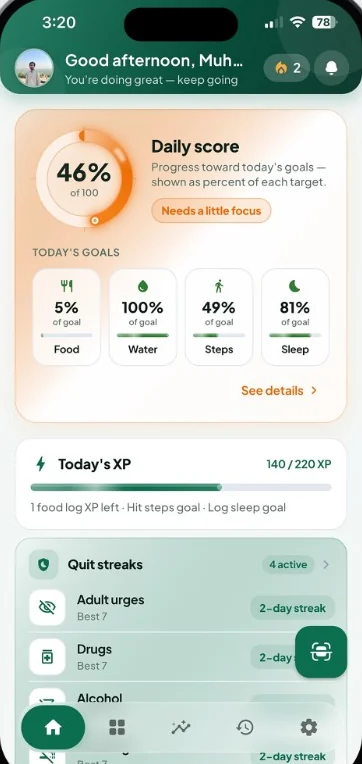
One score for the day.
Food, water, steps, and sleep each show how close you are. XP lists what’s still open, and quit streaks stay in view under the goals.
- Daily score
- Today’s XP
- Quit streaks
Calorie Tracker: Food Log
Point your camera at a meal. The scan names the food, scores it, and folds the calories into the goals, streaks, and plan that make up the rest of your day.
Available on the App Store · Free to download
You don’t build a spreadsheet. You take the photo, check what the scan found, and the rest of the day stays in step.
Open the scanner, choose the meal, and let the camera read what’s actually in front of you.
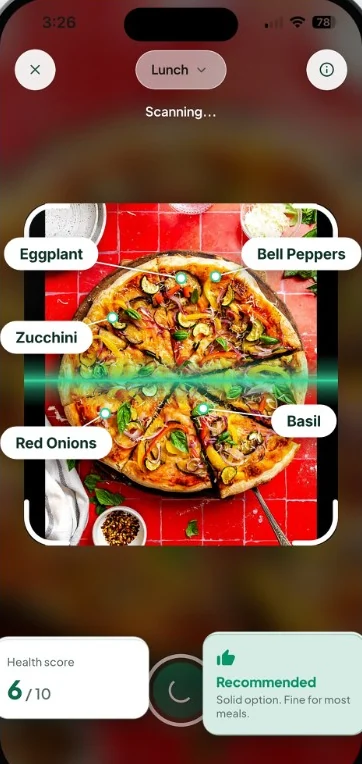
Ingredients are labeled on the photo. A health score and a short recommendation sit underneath for a quick look.
Save the meal and the day updates: calories left, meal goals, your daily score, and the food diary.
The scan is the start. The useful part is what stays attached to the meal once you log it.
Scanning is the start. Calories left, the food diary, and a meal plan all read from the same log, so the number and the plate stay together.
The scanner doesn’t stop at a calorie guess. It marks foods on the photo, shows a health score, and tells you, in a sentence, what kind of choice the meal is.
A vegetable pizza, as this scan reads it: eggplant, bell peppers, zucchini, red onions, and basil.
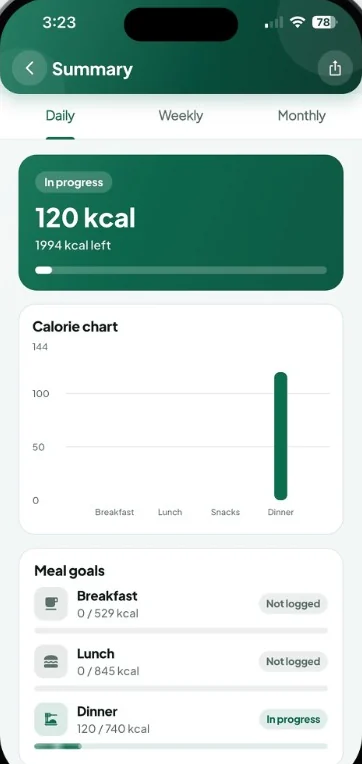
The summary keeps today’s calories in one card, then splits them across breakfast, lunch, snacks, and dinner. A single total never has to explain the whole day.
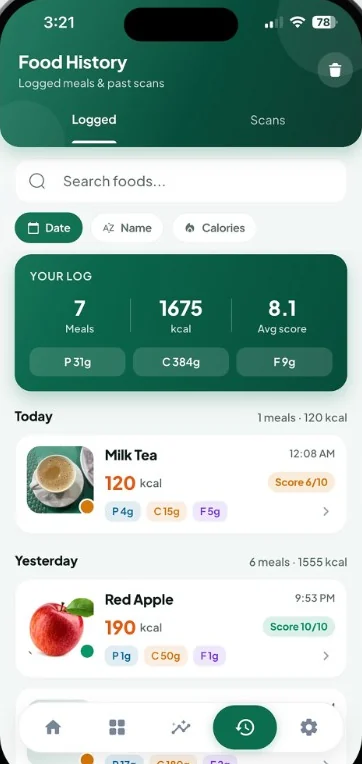
Food History keeps the photo, the calories, the macros, and a score on every entry. Search it, or sort by date, name, or calories when you want one meal back.
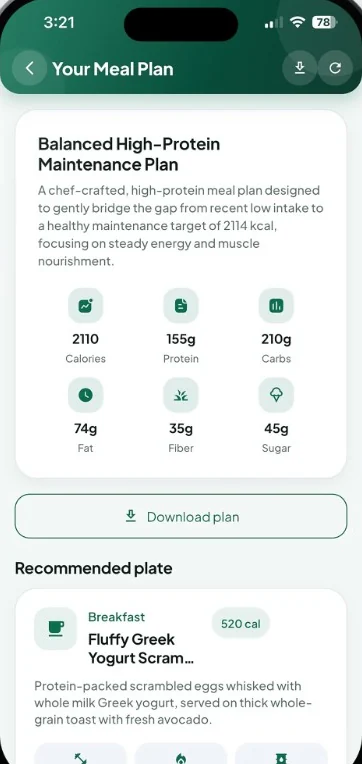
Pick Slim, Bulk, or Maintain. The plan comes back with the day’s calories, protein, carbs, fat, fiber, and sugar, then a recommended plate written in plain language.
The daily score, the longer nutrition view, and a streak leaderboard sit beside the food log. Same routine, three ways to look at it.
Food, water, steps, and sleep each show how close you are. XP lists what’s still open, and quit streaks stay in view under the goals.
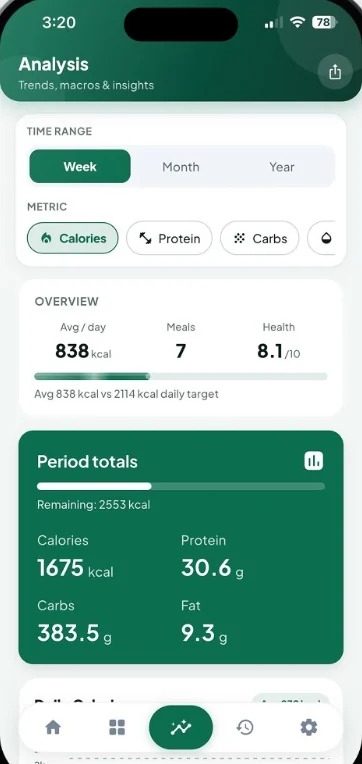
Switch week, month, or year, and flip the metric between calories, protein, and carbs. A period can show average intake, meals logged, and a health score together.
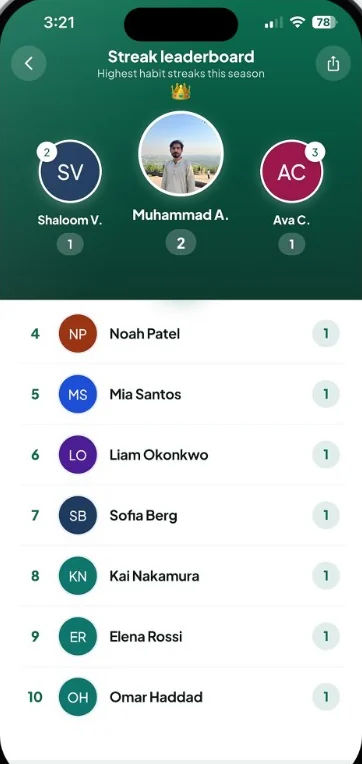
The longest habit streaks this season take the top of the screen. Everyone else follows in a simple list, so showing up has a place to land.
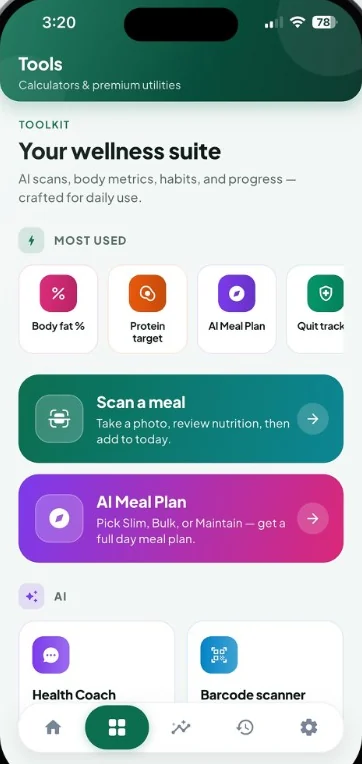
Scan, plan, or open a calculator. The same suite holds body metrics, quit tracking, a health coach, and a barcode lookup. Some tools have free limits or require Premium.
Take a photo, review the ingredients and the score, then add it to today.
Pick Slim, Bulk, or Maintain and get meals, portions, and the day’s nutrients.
A body metric you can open without leaving the suite.
Set the protein number the rest of the day is aiming for.
Keep a longer streak beside the meals you log.
Ask a food question and stay inside the app.
Look up a packaged food before it hits the diary.
Premium utilities live in this same suite. Open one when you need it, then come back to the meal you were logging.
Move through the day, the food log, and the streak board. These are the screens you open after the first photo.
One daily score brings food, water, steps, and sleep together. Today’s XP shows the check-ins still open, and quit streaks stay on the same screen as the rest of your day.
A percent for the day, plus the habits that run longer than a meal.
Get familiar with the app, your options, and what to expect.
Need a little more help?
Contact our support teamCalorie Tracker: Food Log is available for iPhone on the App Store. Use an App Store button on this page, or scan the App Store QR code with your iPhone to open the listing.
Take a meal photo or choose one from your gallery. The scanner labels foods it finds on the image, estimates a health score, and adds a short recommendation. Review the ingredients and portions, then save the meal to today. Photo results are estimates, so a serving may still need an adjustment.
Yes. Each logged meal keeps calories with protein, carbohydrates, and fat, plus a score. The summary shows what’s left today and how breakfast, lunch, snacks, and dinner compare. Analysis then steps back across the week, month, or year.
Food, water, steps, and sleep each have a goal, and the daily score rolls them into one percent. Today’s XP shows which check-ins are still open. Quit streaks sit on the home screen, and a leaderboard ranks habit streaks for the season.
You can start with free access and usage limits. Premium is optional and adds unlimited food scans, unlimited AI coaching, advanced analytics, and selected additional tools and themes. Review current prices, any available trial, and renewal terms in the app before subscribing. Subscriptions are managed through your App Store account.
Our Privacy Policy explains how meal photos, food logs, daily habits, AI processing, and account information are handled. Open the Privacy Policy link in the footer, or read it in the app’s Settings. For privacy questions, email privacy@gbstudio.dev.
Yes. Settings includes 16 language options, light and dark modes, and selectable color themes. Evergreen and Midnight Black are free themes, with more palettes available through Premium. Choose the language and appearance that feel comfortable for your everyday use.
Simple guides to food logging, daily goals, and making the most of Calorie Tracker.